
Everything Shaping the Modern Smartphone: A Guide to How These Devices Actually Work

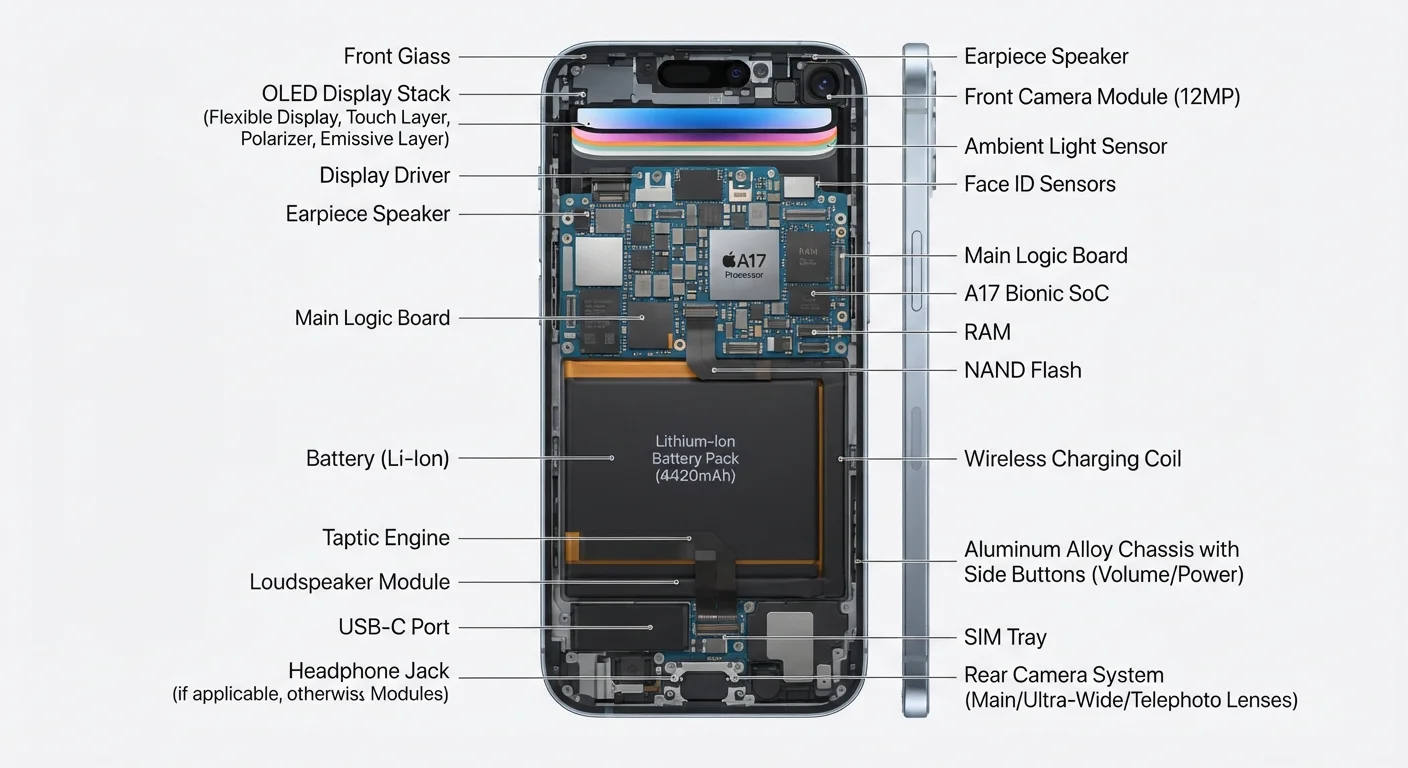
Photo: InsightsVilla.com | Quick Search. Right Info editorial
Key Takeaways
- The processor and RAM work together to determine how fast and smooth your phone feels day-to-day.
- Cellular radios (4G LTE vs. 5G) affect both speed and battery life depending on your location.
- Display technology-LCD vs. OLED vs. AMOLED-directly impacts color accuracy, brightness, and battery drain.
- Camera quality depends as much on software processing as on the physical lens and sensor.
- The operating system controls how apps access hardware, making software updates critical for security and performance.
The Processor: Your Phone's Brain
The System on a Chip (SoC) is the single most important component in any smartphone. Unlike desktop computers, which spread their processing tasks across separate chips, a phone's SoC integrates the central processing unit (CPU), graphics processor (GPU), AI engine, and cellular modem onto one compact piece of silicon.
The CPU handles general tasks - opening apps, loading web pages, running calculations. Multiple processor cores divide this workload, with high-performance cores tackling demanding jobs and efficiency cores managing light tasks to preserve battery. More cores don't automatically mean a faster experience; the architecture and manufacturing process (measured in nanometers) matter just as much.
When comparing phones, look at the SoC generation and nanometer process - a newer manufacturing process (smaller nm number) typically means better performance per watt, translating directly to longer battery life under load.
Enable dark mode on OLED-screen phones to meaningfully reduce display power draw, especially during evening use when your screen is often on for extended periods.
The GPU renders everything you see - animations, games, video playback. A stronger GPU makes scrolling smoother and games more fluid. Many modern SoCs also include a dedicated Neural Processing Unit (NPU), which accelerates machine-learning tasks like voice recognition, real-time photo enhancement, and predictive typing.
Memory and Storage Explained
Smartphones use two distinct types of memory that often get confused. RAM (Random Access Memory) is short-term, active memory - it holds the apps and data your phone is currently using. More RAM means more apps can stay open in the background without needing to reload. Most modern phones ship with 6-12 GB of RAM, though the operating system manages RAM aggressively to prioritize active tasks.
Internal storage is long-term memory - where your photos, apps, music, and documents live permanently. Storage is typically measured in gigabytes (GB) or terabytes (TB). Unlike RAM, storage isn't erased when you power off. The speed of that storage (measured by read/write rates) also affects how quickly apps install and large files transfer.
expandable Storage Is Less Common Now
Radios and Connectivity
A smartphone is essentially a portable radio station. Inside every device are multiple wireless radios managing different types of connections simultaneously.
- Cellular (4G LTE / 5G): Connects you to your carrier's network for calls, texts, and mobile data. 5G offers faster peak speeds in supported areas but can consume more power when actively searching for a 5G signal.
- Wi-Fi: Uses the 2.4 GHz and 5 GHz radio bands (and newer 6 GHz on Wi-Fi 6E devices) to connect to local wireless networks.
- Bluetooth: Short-range radio used for headphones, smartwatches, and accessories.
- GPS: Receives signals from satellites to determine your location accurately.
- NFC (Near Field Communication): Enables contactless payments and quick data transfers at very close range.
6-7 radios
Wireless radios in a typical modern smartphone
Most flagship smartphones include cellular, Wi-Fi, Bluetooth, GPS, NFC, and often an additional ultra-wideband (UWB) radio for precision location features.
120 Hz
Refresh rate on many mid-range and flagship displays
High-refresh-rate screens, once exclusive to premium flagships, have become common in mid-range devices, making smoother scrolling accessible to more users.
All these radios draw power, which is why connectivity settings are one of the most effective levers for managing battery life.
Displays: More Than Just a Screen
The display is your primary interface with everything on the phone. Two main technologies dominate the market:
LCD (Liquid Crystal Display) uses a backlight behind a liquid crystal layer to produce images. It tends to deliver accurate whites and is generally more power-efficient when displaying bright content.
OLED and AMOLED displays light each pixel individually, enabling true blacks (a pixel showing black is simply off) and vivid colors. Because dark pixels consume little power, OLED screens can be more battery-efficient when using dark mode. AMOLED is Samsung's branded version of OLED but works on the same principle.
Refresh rate - measured in hertz (Hz) - describes how many times per second the screen redraws itself. A 60 Hz display refreshes 60 times per second; a 120 Hz display refreshes twice as often, producing noticeably smoother scrolling and animations. Higher refresh rates do consume more battery, so many phones use adaptive refresh rates that scale up or down based on what's on screen.
The Camera System
Modern smartphones typically include multiple rear cameras - wide, ultrawide, and telephoto - each serving a distinct purpose. The image sensor captures light, and a larger sensor generally performs better in low-light conditions. The aperture (expressed as an f-number like f/1.8) describes how wide the lens opens to gather light; a lower f-number means more light reaches the sensor.
However, hardware alone doesn't determine photo quality. Computational photography - software algorithms that process multiple frames simultaneously - now plays an equal or greater role. Features like Night Mode, HDR, and portrait blur (bokeh) are largely software achievements layered on top of capable hardware.
Use Grid Lines and Shoot in Multiple Frames
The front-facing camera follows the same principles. Pixel count (megapixels) is frequently cited but is not the sole indicator of quality - sensor size, aperture, and image processing all contribute to the final result. For a deeper look at keeping your camera and all your phone's components working at peak performance, see our guide to keeping your smartphone running well for years.
Software, the OS, and the App Ecosystem
The operating system (OS) is the master software layer that manages every hardware component and gives apps a consistent environment to run in. Android and iOS are the two dominant mobile operating systems, and both act as intermediaries between the apps you use and the physical hardware underneath.
When an app requests access to your camera, microphone, or location, the OS enforces permissions - deciding whether that access is granted. This layer is also why software updates matter so much: OS updates patch security vulnerabilities that malicious apps or websites might otherwise exploit.
Keep Your OS Updated - Always
Apps themselves live in a structured ecosystem. For everyday users, understanding how the apps and software ecosystem works - from permissions to background activity - helps you stay in control of your device's performance and privacy.
Battery and Power Management
Smartphone batteries are lithium-ion (Li-ion) or lithium-polymer (LiPo) cells. Both store energy through electrochemical reactions and degrade gradually with charge cycles over time. Capacity is measured in milliampere-hours (mAh); a higher number generally means longer runtime, though actual battery life depends heavily on how efficiently the SoC and display manage power.
Fast charging delivers higher wattage to speed up the charge cycle. Wireless charging uses electromagnetic induction to transfer energy without a cable, typically at lower wattage than wired fast charging. Both are legitimate technologies with modest trade-offs around heat and convenience.
Heat Is a Battery's Biggest Enemy
Power management is a system-wide effort: the processor's efficiency cores, adaptive display refresh rates, and radio management all work together to squeeze more usage time from each charge.
The content on this site is for informational purposes only and is not a substitute for professional advice. Always consult a qualified professional for guidance specific to your situation.